Chord Analyzer
Real-time chord detection with music theory analysis
Available Now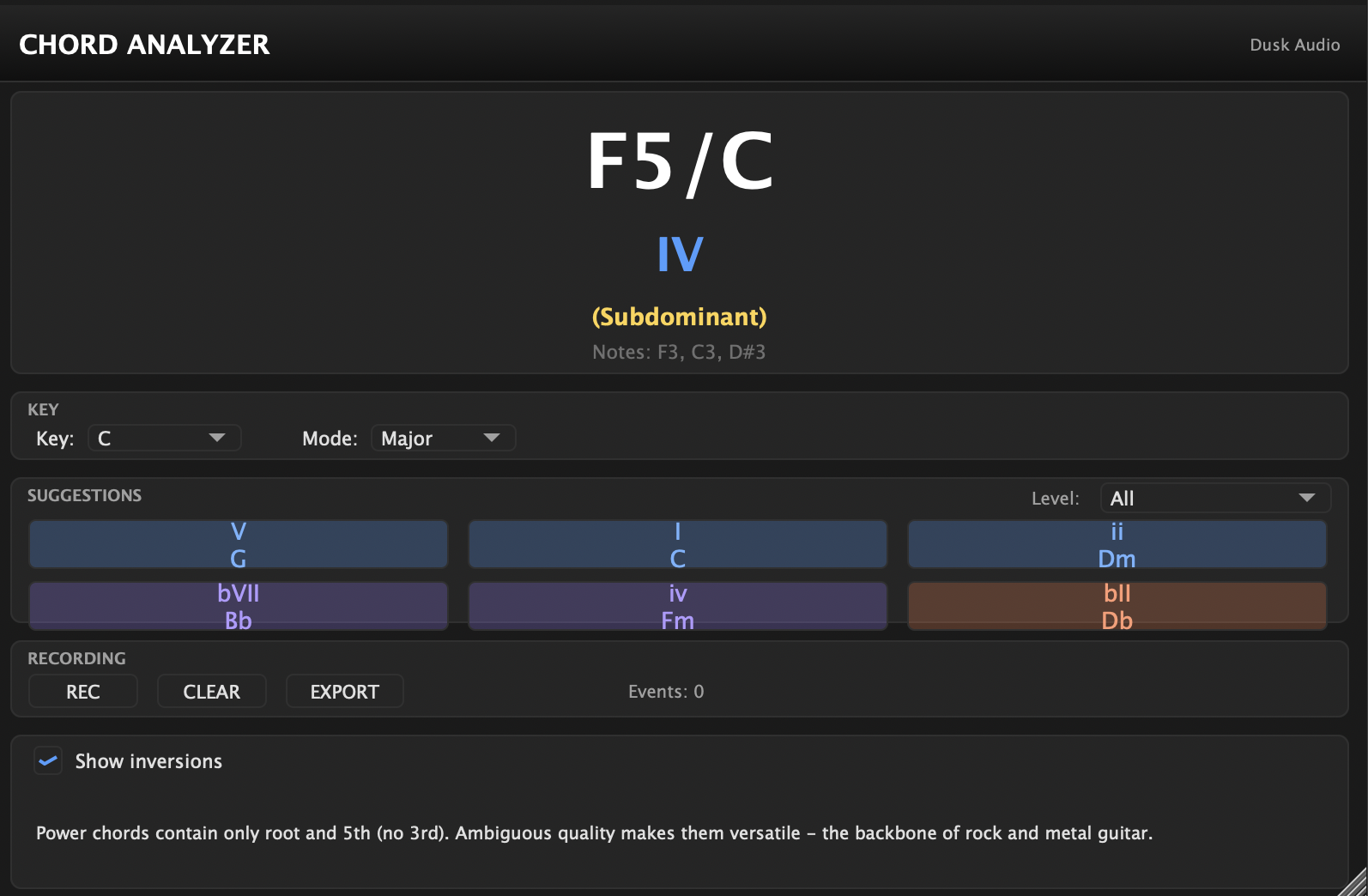
Chord Analyzer is a real-time MIDI chord detection and music theory analysis plugin — completely free.
Overview
Route MIDI to Chord Analyzer and instantly see what chord you’re playing, its Roman numeral in your chosen key, and its harmonic function. Get intelligent suggestions for what chord to play next, from basic I-IV-V progressions to advanced chromatic mediants and Coltrane changes.
Features
Chord Detection
Recognizes 45 chord types including triads, seventh chords, extended chords (9th, 11th, 13th), altered dominants, sus chords, and power chords. Detects inversions and displays slash notation.
Music Theory Analysis
Set your key (any root, major or minor) and see Roman numeral analysis for every chord. Harmonic function labels (Tonic, Subdominant, Dominant, Borrowed, Chromatic) help you understand the role each chord plays.
Chord Suggestions
Three tiers of suggestions based on your current chord:
- Basic — Common progressions (I-IV-V, ii-V-I, vi-IV)
- Intermediate — Secondary dominants, borrowed chords, tritone substitutions
- Advanced — Chromatic mediants, Neapolitan chords, augmented 6th approaches
Session Recording
Record your chord progressions with timing data and export as JSON for analysis, notation software, or further processing.
Educational Tooltips
Hover over any element to learn about chord qualities, harmonic functions, and why certain progressions work.
Three Versions
Chord Analyzer ships in three versions to cover every plugin host:
| Version | Plugin Type | Use In |
|---|---|---|
| Chord Analyzer | Instrument (with UI) | FL Studio, Ableton Live |
| Chord Analyzer MIDI | MIDI Effect (with UI) | Reaper, Bitwig, Logic Pro, Cubase, Ardour, Carla |
| Chord Analyzer Headless | Native LV2, no UI (host renders detected chord) | Zynthian and other headless LV2 hosts |
All three share the same chord-detection engine. The difference is how your host classifies and renders the plugin:
- MIDI variant sits in the dedicated MIDI / Note FX slot of modern DAWs and brings the full visualizer with it.
- Headless variant declares native LV2 output control ports so headless LV2 hosts (Zynthian, etc.) can display the detected chord in their own UI without ever loading our visualizer.
If you’re on a desktop DAW, use the MIDI variant. If you’re on Zynthian or any LV2 host that doesn’t run a plugin GUI, use the Headless variant.
DAW Setup Guide
Bitwig Studio
- Add your synth to a MIDI track as normal
- In the device chain, click + before your synth
- Search for “Chord Analyzer MIDI” in the Note FX category and add it
- MIDI passes through automatically — your synth still receives all notes
Reaper
- Open the FX chain on your MIDI/instrument track
- Click Add and search for “Chord Analyzer MIDI” (VST3)
- Drag it above your synth in the chain
- MIDI passes through to your synth automatically
Logic Pro
- On your instrument track, click the MIDI FX slot (above the Instrument slot)
- Choose Chord Analyzer MIDI under Dusk Audio
- The plugin receives MIDI from the track and passes it through to your instrument
Cubase / Nuendo
- On your instrument track, add “Chord Analyzer MIDI” as a MIDI insert
- The plugin receives MIDI from the track automatically
- Your instrument remains unchanged
Ableton Live
Ableton doesn’t list MIDI-only plugins in MIDI tracks the same way other DAWs do, so use the instrument version with an Instrument Rack:
- Load your synth on a MIDI track as normal
- Select your synth and press Cmd+G (Mac) or Ctrl+G (Windows) to group it into an Instrument Rack
- Click the Show Chain List button (three horizontal lines on the left side of the rack)
- Right-click in the empty space below your synth’s chain and choose Create Chain
- Drag “Chord Analyzer” (the instrument version, not MIDI) from the browser into the new empty chain
- Both chains receive the same MIDI — your synth produces sound, the Chord Analyzer shows chords
FL Studio
Use the instrument version with Patcher:
- Add a Patcher instance to your channel rack
- Inside Patcher, add both “Chord Analyzer” and your synth as nodes
- Route the MIDI input to both plugins in parallel
- Route only your synth’s audio output to the Patcher output
- Both plugins receive MIDI — your synth produces sound, the Chord Analyzer shows chords
Desktop LV2 Hosts (Ardour, Carla)
Use Chord Analyzer MIDI — declares no audio ports, full custom visualizer in the host plugin window.
- Add “Chord Analyzer MIDI” to the MIDI chain before your synth
- MIDI passes through to the next plugin in the chain
- Open the plugin to see the full chord display
Headless LV2 Hosts (Zynthian)
Use Chord Analyzer Headless — it exposes the detected chord through native LV2 output control ports so the host can render it in its own UI.
- Install the bundle from the
chord-analyzer-headless-*.zip(separate download) - Add “Chord Analyzer Headless” to your MIDI chain before your synth
- The detected root, quality, bass and inversion appear as live values in your host’s plugin parameter view
Installation
| Platform | Format | Location |
|---|---|---|
| Linux | VST3 | ~/.vst3/ |
| Linux | LV2 | ~/.lv2/ |
| macOS | AU | ~/Library/Audio/Plug-Ins/Components/ |
| macOS | VST3 | ~/Library/Audio/Plug-Ins/VST3/ |
| Windows | VST3 | C:\Program Files\Common Files\VST3\ |
The main download includes “Chord Analyzer” and “Chord Analyzer MIDI” — install whichever your DAW uses. The “Chord Analyzer Headless” variant ships in a separate -headless- zip aimed at Zynthian and other headless LV2 hosts; download it only if you need it.
Open Source
Chord Analyzer is free and open source. Source code is available on GitHub.
Features
- Real-time chord detection from MIDI input
- 45 chord patterns (triads, 7ths, extended, altered, sus, add)
- Roman numeral analysis in any key (major and minor)
- Harmonic function labels (Tonic, Subdominant, Dominant)
- Inversion detection with slash notation
- 3-tier chord suggestions: Basic, Intermediate, Advanced
- Session recording with JSON export
- Educational tooltips for music theory concepts
- Resizable UI with persistent window size
Changelog
v1.1.4 2026-05-13
- Cubase: Chord Analyzer MIDI now appears in MIDI Inserts slot (VST3 subcategory Fx|Instrument) — fixes #89
v1.1.3 2026-05-08
- Unified double-click-to-edit value entry across all knobs
- Add CLAP plugin format support
- Misc shared LookAndFeel polish
v1.1.1 2026-04-17
- Added Respect Sustain parameter (default on) — when MIDI CC 64 is held, the detected chord persists until the pedal is released. Useful for piano transcription workflows.
- Native LV2 (Headless): added respect_sustain ControlPort at index 10 (existing detection-port indices unchanged)
v1.1.0 2026-04-17
- Added Chord Analyzer MIDI variant: pure MIDI effect with full UI for Logic, Reaper, Bitwig, Cubase, Ardour, Carla
- Added Chord Analyzer Headless variant: native LV2 with output ControlPorts for headless LV2 hosts (Zynthian)
- Added Detected Root / Quality / Bass / Inversion output parameters for generic host UIs
- Replaced short-lived Chord Analyzer FX variant with Chord Analyzer MIDI
- Disabled JUCE phantom MIDI CC parameters in VST3 (cleaner Reaper UI)
v1.0.0 2026-03-29
- Initial release
- 45 chord patterns with root detection and confidence scoring
- Roman numeral analysis with major and minor key support
- 3-tier suggestion system: common progressions, secondary dominants, chromatic mediants
- Session recording with timestamped JSON export
- Educational tooltips for all chord qualities and harmonic functions
- Resizable UI